
Security
Apple dyld Zero‑Day (CVE‑2026‑20700): Why This Patch Window Is Different — and How to Move Fast with MDM Rings
Apple shipped emergency updates after reporting CVE‑2026‑20700 (dyld) was exploited in an ‘extremely sophisticated’ targeted attack. Here’s a practical playbook: scope impact, enforce update rings via MDM, validate compliance, and reduce exposure while change windows catch up.
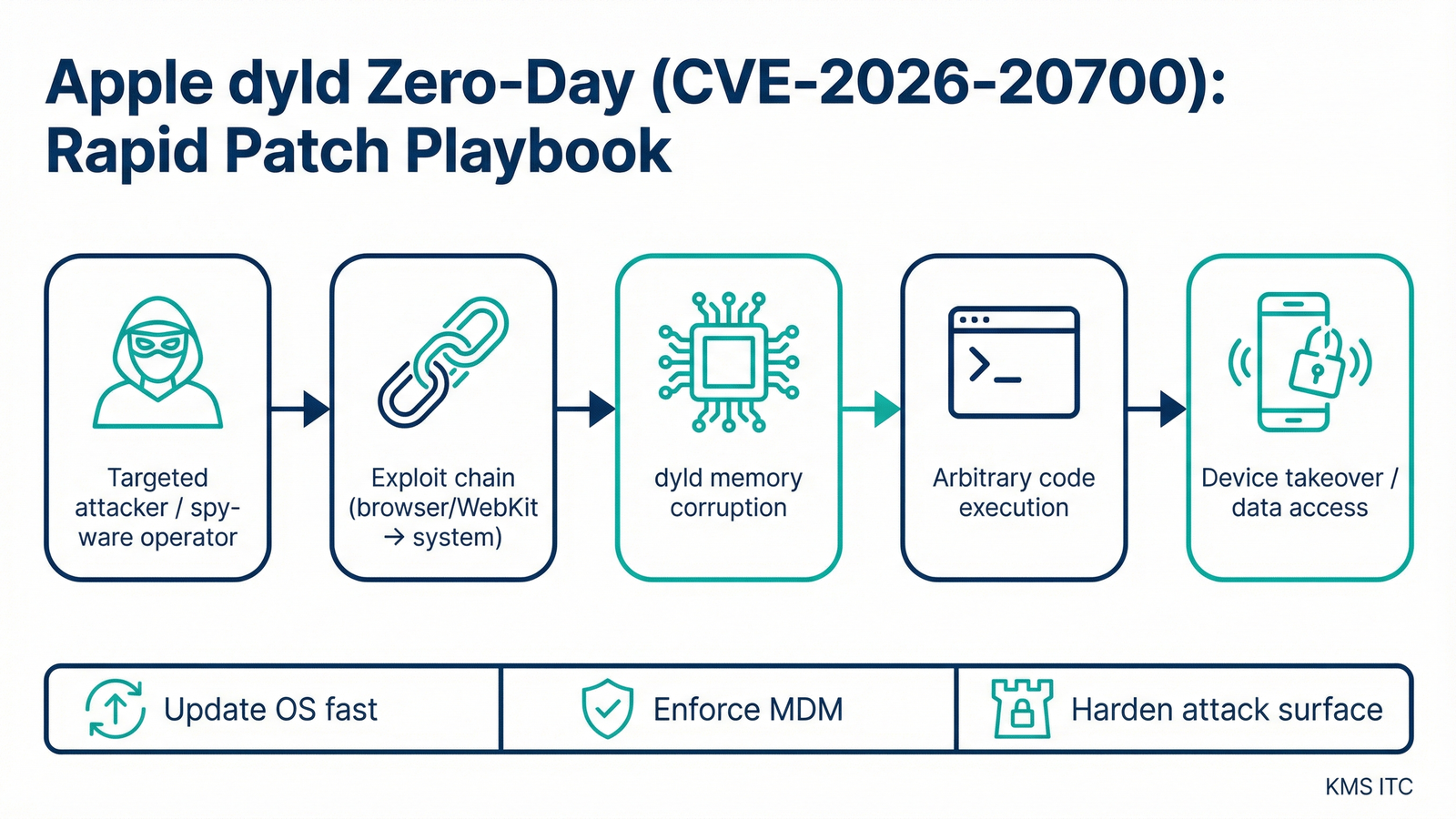
Apple doesn’t often use the phrase “extremely sophisticated attack”.
When it does, assume two things are true at the same time:
- the exploitation is real (not theoretical)
- the victim set is targeted today, but the techniques will diffuse over time
Executive summary (3 bullets)
- This is an “exploit-confirmed” patch window: Apple disclosed CVE‑2026‑20700 (dyld memory corruption) as exploited in a targeted campaign, and shipped fixes in iOS/iPadOS 26.3 (and related platform updates).
- Speed comes from update orchestration, not panic: the winning move is MDM‑driven rings (pilot → executives/admins → fleet) with clean compliance signals and restart completion.
- Reduce blast radius while patching catches up: tighten the most common entry points (browser + messaging + unknown links), and harden privileged workflows on managed devices.
What changed
Apple released security updates that address CVE‑2026‑20700, a memory corruption issue in dyld (the dynamic linker), noting it may have been exploited in an extremely sophisticated attack against specific targeted individuals.
Key operational details that matter for defenders:
- The fix lands in iOS 26.3 / iPadOS 26.3 (and corresponding releases across Apple platforms).
- The issue is described as: “An attacker with memory write capability may be able to execute arbitrary code.”
- Reporting and context point to an exploitation chain consistent with high-end, targeted tooling.
Why it matters
dyld is not “just another app component.”
It sits in the part of the stack where exploitation can turn from:
- “one app crashes” → into
- “arbitrary code execution and persistence opportunities”
Even if your organisation is not the intended target set (journalists, executives, public figures), the defensive priority still holds because:
-
Exploit chains tend to escape their original threat model. Techniques developed for targeted spyware frequently get repackaged into broader campaigns once they’re documented, traded, or reverse engineered.
-
Apple fleets have asymmetric risk. A small subset of devices (executives, admins, staff with high-value access) can create outsized business impact if compromised.
-
Mobile patching is a compliance problem before it’s a technical problem. If you can’t reliably prove “updated + rebooted + enforced,” you don’t actually have coverage.
MDM update ring schedule:
| Ring | Cohort | Target window |
|---|---|---|
| Ring 0 | IT/Sec pilot devices | 2–4 hours |
| Ring 1 | Executives, admins, privileged access users | 24 hours |
| Ring 2 | Corporate fleet | 72 hours |
| Ring 3 | BYOD (or conditional access enforcement) | 7 days |
What to do (copy/paste checklist)
1) Make the scope explicit (today)
- Inventory managed Apple endpoints: iOS/iPadOS, macOS (and any shared/pool devices).
- Identify “high-impact” cohorts: executives, admins, finance, incident responders, and anyone with privileged access apps.
- Confirm which OS versions are in play and what the minimum remediated version is for each platform.
2) Run emergency updates via MDM rings (today → 72h)
- Ring 0 (2–4h): IT/Sec pilot devices; validate update + reboot + core apps.
- Ring 1 (24h): executives + admins + privileged access users.
- Ring 2 (72h): corporate fleet.
- Ring 3 (7d): BYOD guidance (or conditional access requirements for corporate apps, where applicable).
3) Validate coverage with “hard” signals (don’t guess)
- OS version compliance: device reports show the remediated version.
- Reboot completed: do not count “downloaded” as “patched.”
- High-risk apps updated: browsers and mail clients updated in parallel (where app-level updates apply).
4) Reduce exposure while updates roll out (this week)
- Tighten link handling: reinforce “no unknown links,” and use managed browser protections where available.
- Review privileged workflows: ensure admin access happens on managed, compliant devices.
- Confirm endpoint security baselines: passcode/biometric, disk encryption, and MDM profiles are enforced.
Risks/tradeoffs
- Rapid updates can break workflows. Ringing reduces risk, but you still need a rollback/exception story for business-critical devices.
- BYOD is the hard edge. If you can’t enforce OS versions, use conditional access and limit what unmanaged devices can reach.
- Compliance dashboards can lie by omission. Some tools lag on reporting “reboot completed” or “update installed” — validate with a second signal for Ring 0/1.
Sources
If you’re deciding what to do next, map your biggest pain (MDM compliance gaps, patching speed, privileged-user exposure) to the controls/patterns above—then pilot a lightweight version on one initiative.